powershell -Command "Send-MailMessage -To to@recepient.com -Cc cc@recepient.com -From from@sender.com -SmtpServer 127.0.0.1 -Subject $('Mail from computer: ' + (hostname)) -Body $((date).ToString() + ' Mail from computer: ' + (hostname))
Showing posts with label Windows. Show all posts
Showing posts with label Windows. Show all posts
Wednesday, June 25, 2014

Wednesday, October 3, 2012
Autochk cannot run due to an error caused by a recently installed software package. Windows 2008 R2
Windows 2008 R2 is reporting NTFS file system corruption that requires a chkdsk.
I schedule a disk check and reboot, but it fails with this error
Cannot open volume for direct access.
Autochk cannot run due to an error caused by a recently installed software package.
Use system restore feature from the control panel to restore the system to a point prior to the recent software package installation.
An unspecified error occurred (766f6C756d652e63 3f1).

I suspect the antivirus software was denying disk access, but I did not want to uninstall anything.
The safest thing to do with minimal changes seemed to run chkdsk from the Windows 2008 R2 DVD, so I boot from it, start a command prompt and run
chkdsk /f d:


chkdsk runs for a while and repairs some stuff. I reboot back into windows, the drive is OK and the file system errors are gone.
Thursday, September 27, 2012
Emptying the Recycle Bin for a specific user
Suppose you want to empty the recycle bin of a different user but you do not know his password and do not want to reset it or just do not want to login with his account for any reason.
First get the SID of this account, use PsGetSid from PsTools
Then put the SID in the script below and run it. (will not delete until you uncomment the delete lines)
Const strRecycle = "\\$Recycle.Bin\\" 'Windows 2008, for Win7 use: \\Recycler\\
Set objSWbemServices = GetObject _
("WinMgmts:Root\Cimv2")
Dim SIDs : SIDs = Array("S-1-5-21-4040636791-1997804162-1132720628-1008",_
"S-1-5-21-4040636791-1997804162-1132720628-1014",_
"S-1-5-21-4040636791-1997804162-1132720628-1018")
For Each sid In SIDs
Set colDisks = objSWbemServices.ExecQuery _
("Select * From Win32_LogicalDisk " & "Where DriveType = 3")
For Each objDisk In colDisks
Set colDeletedFiles = objSWbemServices.ExecQuery _
("Select * From Cim_DataFile Where Drive = '" _
& objDisk.DeviceId _
& "' And Path = '" & strRecycle & sid & "\\' " _
& "And Hidden = False")
For Each objDeletedFile In colDeletedFiles
WScript.Echo objDeletedFile.Name
'objDeletedFile.Delete
Next
Set colDeletedFolders = objSWbemServices.ExecQuery _
("Select * From Win32_Directory Where Drive = '" _
& objDisk.DeviceId _
& "' And Path = '" & strRecycle & sid & "\\' " _
& "And Hidden = False")
For Each objDeletedFolder In colDeletedFolders
WScript.Echo objDeletedFolder.Name
'objDeletedFolder.Delete
Next
Next
Next
Wednesday, September 26, 2012
Installing Windows Server 2012
So I received an evaluation DVD of Windows Server 2012 at the Microsoft Boot Camp event and finally got some time to try it out.
Windows Server 2012 has several enhancements to Hyper-V, failover clustering in addition to integration with Microsoft cloud services Windows Azure.
I created a new virtual machine in Hyper-V 2008 R2 and booted the iso image


Similarly to Windows 8, the Start Menu has been replaced with the Start Screen. If you hover the cursor over the lower-left corner for a while you will see Start Screen launcher, click it and you get the Metro-style tiled Start Screen, and of course you could have just pressed the Win key


Right click on any empty space, a bottom bar will appear with an icon "All apps", if you click it more applications tiles will appear


Click on Settings, you will get another menu with other options such as shutdown and restart

Windows Server 2012 has several enhancements to Hyper-V, failover clustering in addition to integration with Microsoft cloud services Windows Azure.
I created a new virtual machine in Hyper-V 2008 R2 and booted the iso image


Initially I got the following error, which turned out to be a corrupt image:
A media driver your computer needs is missing. This could be a DVD, USB or Hard disk driver. If you have a CD, DVD, or USB flash drive with the driver on it, please insert it now.
Note: If the installation media for Windows is in the DVD drive or on a USB drive, you can safely remove it for this step.

I got another good copy and proceeded

As you can see there is no Enterprise edition anymore. Windows Server 2012 comes in 2 editions both of which have the same features: Standard allows you to run 2 VMs and Data Center can run unlimited number of VMs.

I choose to perform a new clean installation, select the disk drive and continue
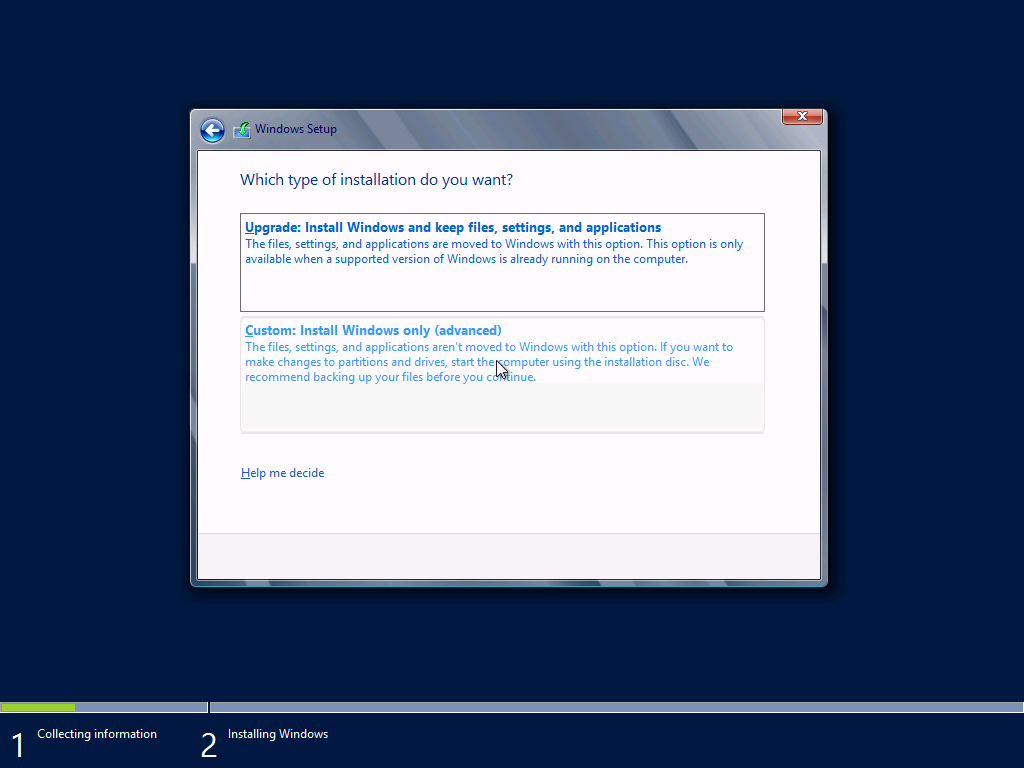

The installation goes on as usual, reboots a couple of times then prompts for the Administrator password


While you type the new Administrator password, you get an eye button that shows the password if you click hold it


Now the setup is complete and the login screen appears


After you login, the Server Manager pops up. The user interface is similar to the Windows 8 Desktop

This default installation is using around 12GB of disk space and 600MB of memory


Right click on any empty space, a bottom bar will appear with an icon "All apps", if you click it more applications tiles will appear


Right click any tile and the bottom bar will appear with more choices

Click on Desktop to return back to the desktop.
2 other hot spots at the top and bottom right corners, hovering over them shows the Charms Bar

Click on Settings, you will get another menu with other options such as shutdown and restart

Sunday, February 19, 2012
Windows 2008 Sysprep, Newsid
To prepare a Windows 2008 template image for cloning:

- Run c:\Windows\System32\sysprep\sysprep.exe
- Configure the dialog box as in the screenshot below
- Create your image after the machine is shut down. Windows will reconfigure itself on the next boot.

Subscribe to:
Posts (Atom)